> ## Documentation Index
> Fetch the complete documentation index at: https://bun-1dd33a4e-farm-d3f3c56f-import-meta-hot-for-bun-hot.mintlify.site/llms.txt
> Use this file to discover all available pages before exploring further.
# Watch Mode
> Automatic reloading in Bun with --watch and --hot modes
Bun supports two kinds of automatic reloading:
* `--watch` mode, which hard restarts Bun's process when imported files change.
* `--hot` mode, which soft reloads the code (without restarting the process) when imported files change.
***
## `--watch` mode
Watch mode works with `bun test` and when running TypeScript, JSX, and JavaScript files.
To run a file in `--watch` mode:
```bash terminal icon="terminal" theme={"theme":{"light":"github-light","dark":"dracula"}}
bun --watch index.tsx
```
To run your tests in `--watch` mode:
```bash terminal icon="terminal" theme={"theme":{"light":"github-light","dark":"dracula"}}
bun --watch test
```
In `--watch` mode, Bun keeps track of all imported files and watches them for changes. When a file changes, Bun restarts the process with the same CLI arguments and environment variables as the initial run. If Bun crashes, `--watch` attempts to restart the process.
**⚡️ Reloads are fast.** The filesystem watchers you're probably used to have several layers of libraries wrapping the native APIs or, worse, rely on polling.
Instead, Bun uses the operating system's native filesystem watcher APIs, like kqueue or inotify, to detect file changes. Bun also applies several optimizations to scale to larger projects, such as setting a high rlimit for file descriptors, statically allocating file path buffers, and reusing file descriptors when possible.
The following examples show Bun live-reloading a file as it is edited, with VSCode configured to save the file [on each keystroke](https://code.visualstudio.com/docs/editor/codebasics#_save-auto-save).
```sh terminal icon="terminal" theme={"theme":{"light":"github-light","dark":"dracula"}}
bun run --watch watchy.tsx
```
```tsx title="watchy.tsx" icon="https://mintcdn.com/bun-1dd33a4e-farm-d3f3c56f-import-meta-hot-for-bun-hot/B1HU0ph4qZFBSiAj/icons/typescript.svg?fit=max&auto=format&n=B1HU0ph4qZFBSiAj&q=85&s=7b34f4a33519938000740b4c2a95611f" theme={"theme":{"light":"github-light","dark":"dracula"}}
import { serve } from "bun";
console.log("I restarted at:", Date.now());
serve({
port: 4003,
fetch(request) {
return new Response("Sup");
},
});
```
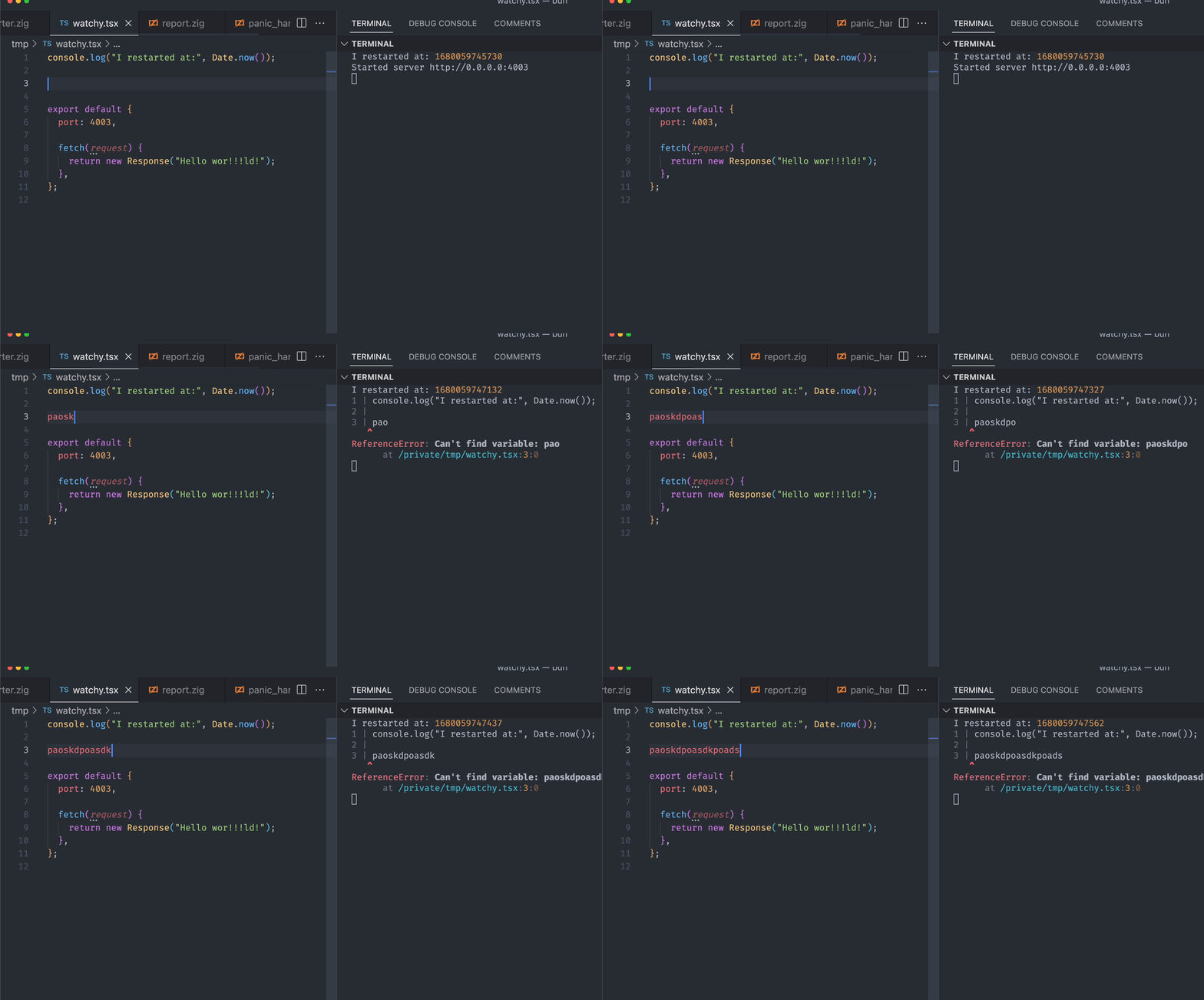
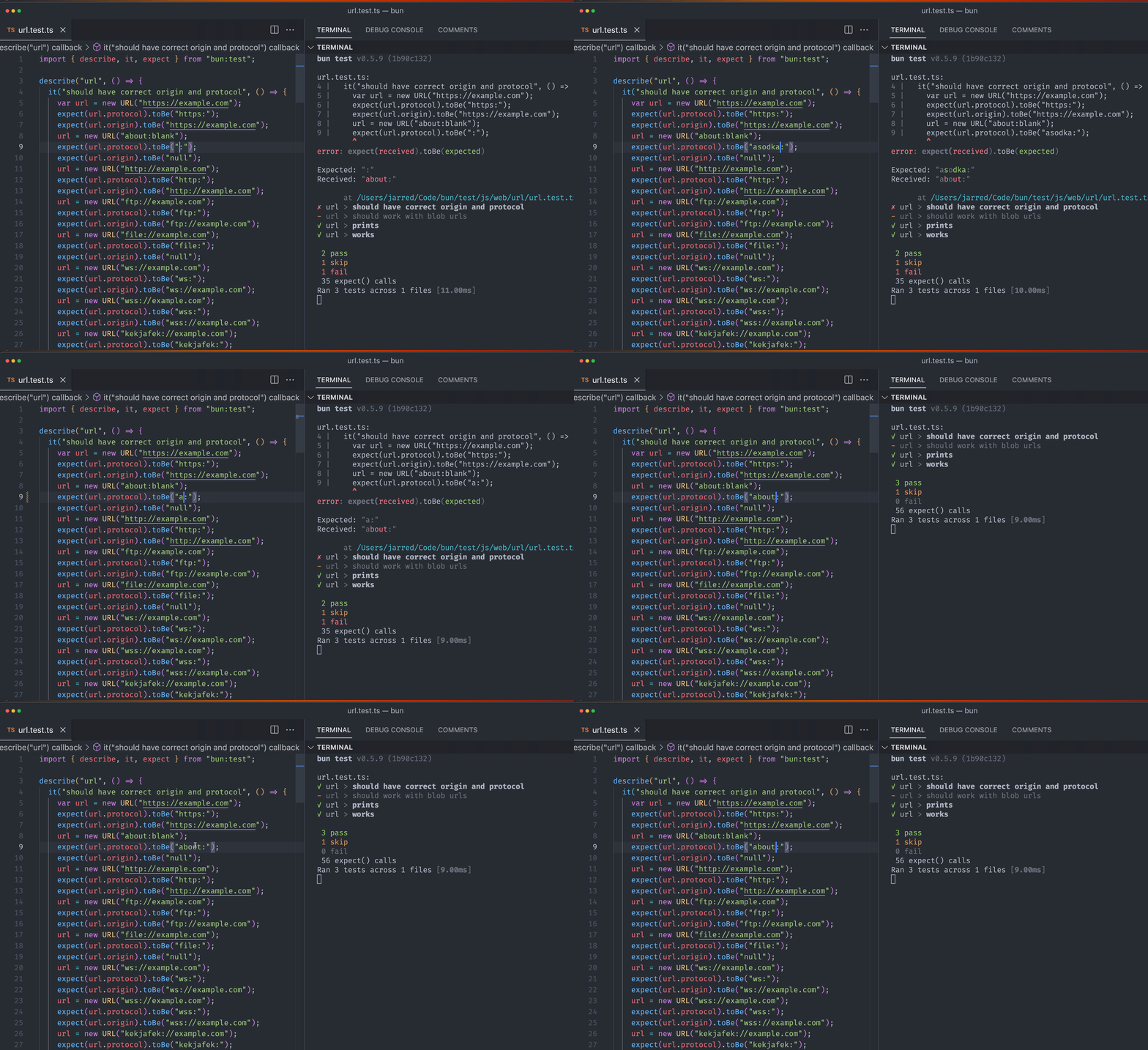
Running `bun test` in watch mode with `save-on-keypress` enabled:
```bash terminal icon="terminal" theme={"theme":{"light":"github-light","dark":"dracula"}}
bun --watch test
```
The **`--no-clear-screen`** flag, like TypeScript's `--preserveWatchOutput`, keeps Bun from clearing the terminal in
watch mode. Use it when running multiple `bun build --watch` commands at the same time with a tool like
`concurrently`, where one instance clearing the screen could hide another's errors: `bun build --watch --no-clear-screen`.
Before each restart, `bun run --watch` runs the handlers your script registered for the kill signal (default
`SIGTERM`, matching the signal Node.js sends its watched process). Use **`--watch-kill-signal`** to pick a different
signal, e.g. `bun --watch --watch-kill-signal SIGINT index.ts`.
***
## `--hot` mode
Use `bun --hot` to enable hot reloading when executing code with Bun. Unlike `--watch` mode, Bun doesn't hard-restart the entire process. It detects code changes and updates its internal module cache with the new code.
This is not the same as hot reloading in the browser. Many frameworks provide a "hot reloading" experience, where you
can edit & save your frontend code (say, a React component) and see the changes reflected in the browser without
refreshing the page. Bun's `--hot` is the server-side equivalent of this experience. To get hot reloading in the
browser, use a framework like [Vite](https://vite.dev).
```bash terminal icon="terminal" theme={"theme":{"light":"github-light","dark":"dracula"}}
bun --hot server.ts
```
Starting from the entrypoint (`server.ts` in this example), Bun builds a registry of all imported source files (excluding those in `node_modules`) and watches them for changes. When a file changes, Bun performs a "soft reload". All files are re-evaluated, but global state (notably, the `globalThis` object) persists.
```ts title="server.ts" icon="https://mintcdn.com/bun-1dd33a4e-farm-d3f3c56f-import-meta-hot-for-bun-hot/B1HU0ph4qZFBSiAj/icons/typescript.svg?fit=max&auto=format&n=B1HU0ph4qZFBSiAj&q=85&s=7b34f4a33519938000740b4c2a95611f" theme={"theme":{"light":"github-light","dark":"dracula"}}
globalThis.count ??= 0;
console.log(`Reloaded ${globalThis.count} times`);
globalThis.count++;
// prevent `bun run` from exiting
const interval = setInterval(function () {}, 1000000);
// stop this version's interval before the next version starts its own
import.meta.hot.dispose(() => clearInterval(interval));
```
If you run this file with `bun --hot server.ts`, you'll see the reload count increment every time you save the file. Because the process is not restarted, anything a module creates at the top level (timers, event listeners, workers, database connections) keeps running after a reload unless the module releases it; [`import.meta.hot.dispose()`](#import-meta-hot) is the hook for that.
```bash terminal icon="terminal" theme={"theme":{"light":"github-light","dark":"dracula"}}
bun --hot index.ts
```
```txt theme={"theme":{"light":"github-light","dark":"dracula"}}
Reloaded 1 times
Reloaded 2 times
Reloaded 3 times
```
Traditional file watchers like `nodemon` restart the entire process, so HTTP servers and other stateful objects are lost. By contrast, `bun --hot` reflects the updated code without restarting the process.
### HTTP servers
You can update your HTTP request handler without shutting down the server: when you save the file, Bun reloads the server with the updated code without restarting the process. This results in seriously fast refresh speeds.
```ts title="server.ts" icon="https://mintcdn.com/bun-1dd33a4e-farm-d3f3c56f-import-meta-hot-for-bun-hot/B1HU0ph4qZFBSiAj/icons/typescript.svg?fit=max&auto=format&n=B1HU0ph4qZFBSiAj&q=85&s=7b34f4a33519938000740b4c2a95611f" theme={"theme":{"light":"github-light","dark":"dracula"}}
globalThis.count ??= 0;
globalThis.count++;
Bun.serve({
fetch(req: Request) {
return new Response(`Reloaded ${globalThis.count} times`);
},
port: 3000,
});
```
### `import.meta.hot`
Under `bun --hot`, every module (the entrypoint and everything it imports) gets an `import.meta.hot` object with a subset of the [Vite HMR API](https://vite.dev/guide/api-hmr). Everywhere else (`bun run` without `--hot`, `bun build`, `Bun.Transpiler`, and inside `Worker`s, which are not reloaded) `import.meta.hot` is `undefined`.
Without `--hot`, a call written out in full, such as `import.meta.hot.dispose(...)`, is removed at transpile time, and each `import.meta.hot.data` expression becomes a new empty object, which is why the example below also runs under plain `bun run`. Anything else needs an `if (import.meta.hot)` guard: storing `import.meta.hot` (or `import.meta`) in a variable, destructuring it, or passing one of its methods to a function throws a `TypeError` without `--hot`, and a value put into `data` by one expression is not visible to the next. The bundler's [`import.meta.hot`](/bundler/hot-reloading#import-meta-hot-api-reference) follows the same rules.
```ts title="server.ts" icon="https://mintcdn.com/bun-1dd33a4e-farm-d3f3c56f-import-meta-hot-for-bun-hot/B1HU0ph4qZFBSiAj/icons/typescript.svg?fit=max&auto=format&n=B1HU0ph4qZFBSiAj&q=85&s=7b34f4a33519938000740b4c2a95611f" theme={"theme":{"light":"github-light","dark":"dracula"}}
import { SQL } from "bun";
// `data` survives reloads of this module. Under plain `bun run` this line
// initializes a throwaway object instead, so it works in both modes.
const state = (import.meta.hot.data.state ??= { reloads: 0 });
console.log(`reloaded ${state.reloads++} times`);
const interval = setInterval(() => console.log("tick"), 1000);
const sql = new SQL(process.env.DATABASE_URL!);
import.meta.hot.dispose(async () => {
// Runs on the next reload, before any module is re-evaluated. Anything this
// version of the module created that the next one should not inherit goes here.
clearInterval(interval);
await sql.close();
});
```
| Property | Description |
| ----------- | ---------------------------------------------------------------------------------------------------------------------------------------------------------------------------------------------------------------------------------------------------------------------------------------------------------------------------------------------------- |
| `data` | An object kept across reloads, one per module. It starts out as `{}`; under `--hot`, mutating it and assigning to it both persist. |
| `dispose()` | Registers a callback that is passed `data`. All callbacks registered since the previous reload run on the next one, in registration order (a module's before its importers'), before any module is re-evaluated, even if the module that registered them is not evaluated again. If they return promises, Bun waits for all of them to settle first. |
| `accept()` | No-op: `bun --hot` re-evaluates every module on each change, so every module implicitly accepts its own updates. |
`decline()`, `on()`, `off()`, `prune()`, `invalidate()` and `send()` also exist as no-ops, so modules written for Vite or for Bun's bundler dev server load under `--hot`. `prune()` has nothing to do here because a module the new code no longer imports still gets its `dispose()` callbacks run.
An error thrown by a dispose callback (or a rejected promise returned from one) is printed like any other error in the reloaded file and does not stop the reload or the process. Changes saved while dispose promises are still pending are picked up by the reload that runs once they settle.
A `--preload` script is evaluated once per process rather than once per reload, so a `dispose()` callback registered there runs on the first reload only and the script is not evaluated again, unless the entrypoint also imports it, in which case it is reloaded like any other module.
`Bun.serve()` is reused across reloads: calling it again during a reload hands the new handlers to the server that is already listening, so open connections survive and no dispose callback is needed. To get a fresh server on every reload instead, stop the old one from `dispose()`; that releases the port immediately and the next version's `Bun.serve()` binds it again. Passing `id: null` on its own is not enough: it only stops the reload from reusing the server, so the old one keeps listening.
```ts title="server.ts" icon="https://mintcdn.com/bun-1dd33a4e-farm-d3f3c56f-import-meta-hot-for-bun-hot/B1HU0ph4qZFBSiAj/icons/typescript.svg?fit=max&auto=format&n=B1HU0ph4qZFBSiAj&q=85&s=7b34f4a33519938000740b4c2a95611f" theme={"theme":{"light":"github-light","dark":"dracula"}}
const server = Bun.serve({ port: 3000, fetch: handler });
import.meta.hot.dispose(() => {
server.stop();
});
```
The bundler's dev server implements more of this API (per-module accept boundaries, `data` transfer between module
versions, HMR events); see [Hot reloading](/bundler/hot-reloading).
On hot reload, Bun:
* Runs the `import.meta.hot.dispose()` callbacks registered since the previous reload, and waits for any promises they returned
* Resets the internal `require` cache and ES module registry (`Loader.registry`)
* Runs the garbage collector synchronously (to minimize memory leaks, at the cost of runtime performance)
* Re-transpiles all of your code from scratch (including sourcemaps)
* Re-evaluates the code with JavaScriptCore
This implementation isn't particularly optimized. It re-transpiles files that haven't changed. It makes no attempt at incremental compilation. It's a starting point.